How to Play (Almost) Any Song on Guitar (The Easy Way)

· 2 min read
Musician @ Bandfix

Tired of finding songs with impossible chords? Here's the shortcut I use.

TL;DR: Learn six easy "G-key family" chords. Import any song into Bandfix app. Use the 'Capo' feature to change the song's key to 'G'. The app tells you where to put the capo, and you just play the easy chords you know.


1. Learn the Easy G-Key Family

These are your new go-to chords. The first four are "anchor" chords: your ring and pinky fingers never move from the 3rd fret (B and high E strings).

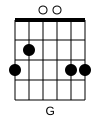
  • G: 320033


    G Chord
  • C: x32033 (From G, move 2 fingers down 1 string)
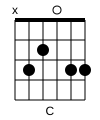

    C Chord
  • Em: 022033 (From G, just lift your 2 fingers)
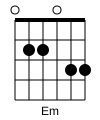

    Em Chord
  • D: xx0233 (From C, lift 1 finger, move the other)
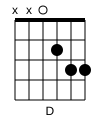

    D Chord
  • Am: x02010 (Rarely used, just two fingers. Easy.)
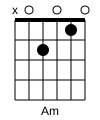

    Am Chord
  • Bm: x2023x (Rarely used, Index on A-2nd, Middle on G-2nd, Ring on B-3rd. No barre!)
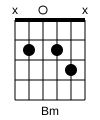

    Bm Chord

Practice switching between these. These six chords unlock thousands of songs.


2. Get the Song

Find any song on Ultimate Guitar and copy the web address (URL).

Open Bandfix app. Go to 'Explore' tab -> 'Import Songs' -> 'Import from the Internet' and paste the link. The song is now in your library.


3. The "Magic" Capo Trick

Open your imported song and tap 'Go Live' (in the top-right menu). You'll see the original, hard chords.

  1. Tap the menu (three dots, top-right).
  2. Select 'Capo'.
  3. You'll see a dropdown menu. Tap it and select 'G' from the list of keys.

That's it. Bandfix instantly changes all the chords to your new easy G-family chords and tells you exactly where to put your capo: (e.g., 'Capo on the 3rd fret').

Put the capo where it says, play your easy shapes, and you're playing the song in its original key.


4. Strumming (Keep it Simple)

Don't worry about complex strum patterns. Just listen to the song and tap your foot.

Strum down every time your foot hits the floor. Focus on clean chord changes. The simple, steady strum will sound great.

The Sub Needs Charts NOW: Onboarding a Guest Musician

· One min read
Musician @ Bandfix

Your keyboardist has the flu. You hire a sub for tonight's gig. They're a pro, but they don't know your arrangements. You have 40 songs. You don't have a "book" because you're all digital. Do you spend 3 hours screenshotting your iPad and emailing 40 JPEGs?

The Old Way: Printing out a binder (waste of paper/time). Or sharing a Dropbox folder where the file names are "Song1_final_final.pdf" and hoping they figure it out.

The Bandfix Way: Band Roles (Viewer) and Share Setlist.

  1. Invite the sub to your band as a Viewer (so they can't accidentally delete anything).
  2. They download the app and log in.
  3. They instantly see the setlist and all the charts, exactly as you see them.

Pro Tip: If they don't want to install an app, you can Export the Setlist to PDF or Word from Bandfix and email them a single, clean document.

Make subbing easy and stress-free. Download Bandfix

Stop Using Folders: Why Tags Are Better for Setlists

· One min read
Musician @ Bandfix

You have a song called "Sweet Caroline." You put it in your "Oldies" folder. But now you're playing a wedding, and you need it in your "Wedding" folder. You have to duplicate the file. Now you have two versions. You update the chords on one, but forget the other. It's a mess.

The Old Way: Rigid folder structures that force a song to live in only one place.

The Bandfix Way: Smart Tags.

  • One Song, Many Tags: Tag "Sweet Caroline" with #Oldies, #Wedding, #SingAlong, and #CrowdPleaser.
  • Instant Filtering: When you need a wedding song, just filter by #Wedding. The song appears. It's the same master file, so any edits apply everywhere.

Pro Tip: Create a tag called #NeedsPractice so you can quickly pull up a list of songs you need to shed before the next gig.

Organize your library like a pro. Download Bandfix

Stop Hugging the Mic Stand: How to Move Freely

· One min read
Musician @ Bandfix

You're the front person. You're playing guitar. You're also reading lyrics off an iPad clipped to your mic stand. You're trapped. You can't walk to the edge of the stage. You can't interact with the crowd. You look like a statue because if you move your hand to scroll, you stop playing guitar.

The Old Way: You try to memorize everything (risky). Or you awkwardly stop strumming for a second to swipe the screen, killing the groove.

The Bandfix Way: Break free with Bluetooth Pedal Support and Autoscroll.

  • Bluetooth Pedal: Tap a footswitch to scroll down or switch songs. Your hands stay on your instrument.
  • Autoscroll: Set the tempo, hit start, and the lyrics roll by automatically like a teleprompter. You don't even have to tap a pedal.

Pro Tip: Set a Pre-roll time in Autoscroll settings so the scrolling starts exactly when the vocals come in, not during the intro.

Be a performer, not a statue. Download Bandfix

Stop Hitting the Spacebar: Control Ableton/Logic Directly from Your Setlist

· One min read
Musician @ Bandfix

You're the drummer. You have a laptop next to your hi-hat running backing tracks in Ableton. To start the song, you have to twist your body, reach over with a drumstick, and try to hit the spacebar without knocking over your beer. It looks unprofessional and breaks your flow.

The Old Way: Assigning a "start" key to a MIDI pad that you hit with your stick. But you still have to look at the computer screen to make sure the right session is loaded.

The Bandfix Way: Global MIDI Settings.

  1. Connect your iPad to your laptop via USB or Bluetooth MIDI.
  2. Configure Bandfix to send a MIDI Start command when you tap "Play" on the setlist.
  3. Configure it to send a MIDI Stop command when you tap "Stop."

Pro Tip: Use Program Change messages to automatically load the correct Ableton scene for each song when you swipe to it.

Keep your hands on the drums, not the laptop. Download Bandfix

The "Squint and Pray": Reading Charts on a Dark Stage

· One min read
Musician @ Bandfix

The stage is pitch black. Then the strobe lights hit. You look at your PDF. It's a tiny A4 page shrunk down to an iPad Mini screen. You can't tell if that's a Dm or a Bm. You squint. You guess. You play a D major. It was supposed to be B minor. The sound guy winces.

The Old Way: Pinching and zooming constantly. Or printing lyrics in font size 24 (which means one song is 5 pages long).

The Bandfix Way: Content Fit Mode and High Contrast.

  • Reflow: Bandfix isn't a PDF reader. It's a dynamic chord chart. The text automatically resizes to fill your screen perfectly. No pinching. No zooming.
  • High Contrast: White text on a pure black background. It cuts through the darkness (and the stage fog) without blinding you.

Pro Tip: Use "Big Mode" (text scaling) in settings if you stand far away from your tablet.

Stop guessing and start playing. Download Bandfix

The Song Started Too Fast: Keep Your Drummer Locked In (Visually)

· One min read
Musician @ Bandfix

It's the big ballad. Adrenaline is pumping. The drummer counts it off... at 140 BPM. It's supposed to be 90. The singer is gasping for air trying to fit the words in. The emotional moment is ruined because it sounds like a chipmunk remix.

The Old Way: The drummer wears headphones with a click track (annoying). Or you just glare at them until they slow down (awkward).

The Bandfix Way: Visual Metronome.

  • Silent Pulse: The screen flashes on the beat.
  • Synced to Setlist: You save the tempo for each song. When you switch to "The Ballad," the metronome automatically sets to 90 BPM.
  • Shared Pulse: If you're using Bandfix on multiple devices, everyone sees the same flash.

Pro Tip: You don't need to use it for the whole song. Just use it for the count-off to establish the groove, then turn it off.

Lock in the groove every time. Download Bandfix

That Solo is Too Fast: How to Practice at 70% Speed

· One min read
Musician @ Bandfix

You're trying to learn a lightning-fast solo. You go to YouTube and slow it down to 0.75x speed. Suddenly, the singer sounds like a demon from the underworld and the guitar sounds like a dying whale. You can't hear the notes because the pitch has dropped into the basement.

The Old Way: You struggle through it at full speed and develop bad habits. or you use expensive, complicated DAW software just to slow down one MP3.

The Bandfix Way: Slow down the time, not the pitch, with Speed Control.

  1. Upload the audio track to your song in Bandfix.
  2. Open the Audio Player.
  3. Dial the speed down to 70% (or whatever you need).

The pitch stays exactly the same. The singer sounds normal, just... slower. You can hear every nuance and nail the lick.

Pro Tip: Loop the difficult section using the A-B Loop feature in the audio player so you can drill it over and over without hitting rewind.

Master the hard stuff without the headache. Download Bandfix

The Singer Lost Their Voice? Drop the Key in 3 Seconds

· One min read
Musician @ Bandfix

It's 10 PM. Third set. Your singer turns to you with terror in their eyes. "I can't hit the high A in 'Don't Stop Believin'." The crowd is waiting. You have five seconds to transpose a song full of barre chords down a half-step. Panic sets in.

The Old Way: You try to do mental gymnastics while the drummer counts off. "Okay, E becomes Eb... B becomes Bb..." You inevitably miss a chord, the singer glares at you, and the energy dies. Or worse, you try to tune down and your guitar goes out of tune.

The Bandfix Way: Stop sweating the math. With Instant Transposition, you can change the key of any song with two taps.

  1. Open the song in Live Mode.
  2. Tap Transpose.
  3. Hit -1 (or however many steps you need).

Boom. Every chord on your screen updates instantly. You don't have to think; you just read.

Pro Tip: Use the Capo tool in Live Mode if you want to keep your open chord shapes but play in a different key. Tell Bandfix where your capo is, and it does the rest.

Save your next gig from disaster. Download Bandfix

Why Your Singer and Guitarist Are Arguing About the Chart

· One min read
Musician @ Bandfix

You're sharing a chart. The guitarist says, "I need the chords!" The singer says, "The chords are distracting me, I just need the lyrics!" You end up making two different versions of the same song. Now you have double the work to update them.

The Old Way: Compromising with a messy chart that neither person likes. Or printing separate binders.

The Bandfix Way: Lyrics & Chords Toggle.

  • One Song, Two Views: It's the same file.
  • Guitarist View: Taps "Show Chords." Sees everything.
  • Singer View: Taps "Lyrics Only." The chords disappear. The text reflows. It's clean.

Pro Tip: Bassists can use "Chords Only" mode to see the progression without the clutter of lyrics.

Give everyone exactly what they need. Download Bandfix